
Quick History #
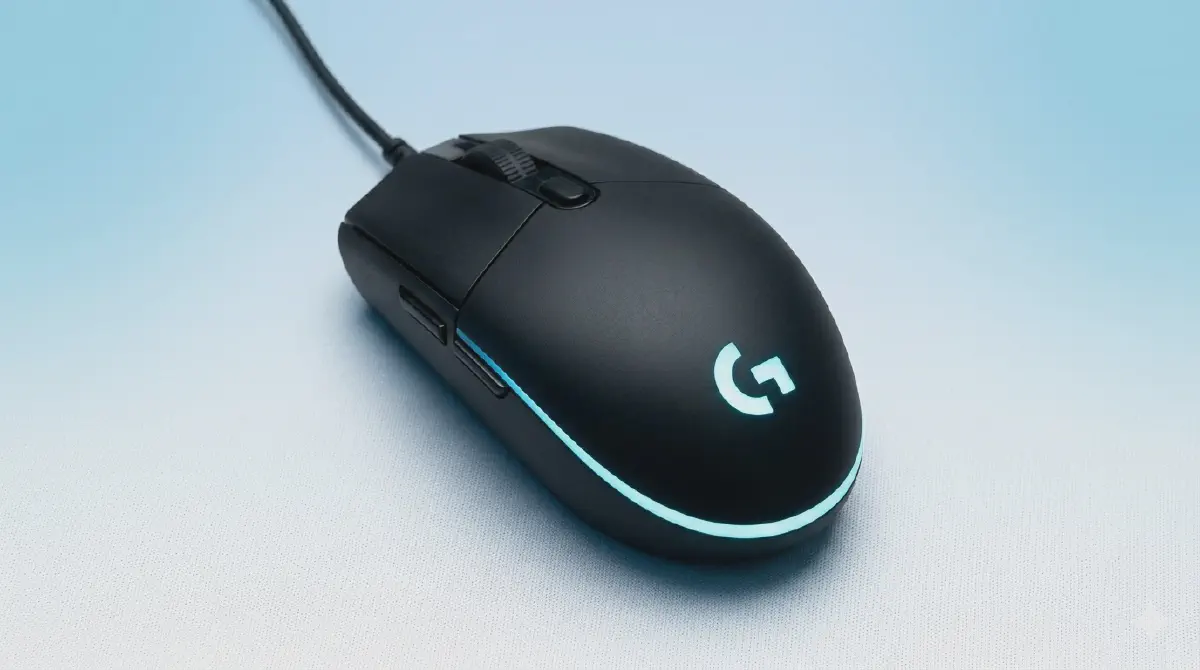
The Logitech G102 (known as the G203 in some regions) is widely considered one of the best gaming mouse in its price range, and has maintained its relevance as a budget-friendly, high-performance option for nearly a decade since its 2016 debut. Since the original launch, there have been 2 primary generations of the Logitech G102 released, along with a internal revision to the sensor technology in recent years:
- Logitech G102 Prodigy
- Logitech G102 LIGHTSYNC
- Logitech G102 LIGHTSYNC (Internal Revision ~2023)
Specs #
| Version | G102 Prodigy | G102 LIGHTSYNC | G102 LIGHTSYNC (Internal Revision) |
|---|---|---|---|
| Release Year | 2016 | 2020 | ~2023 |
| Max DPI | 8,000 | 8,000 | 8,000 |
| RGB Zones | 1-Zone (Single Color) | 3-Zone (Rainbow) | 3-Zone (Rainbow) |
| Click Rating | 10 Million | 10 Million | 10 Million |
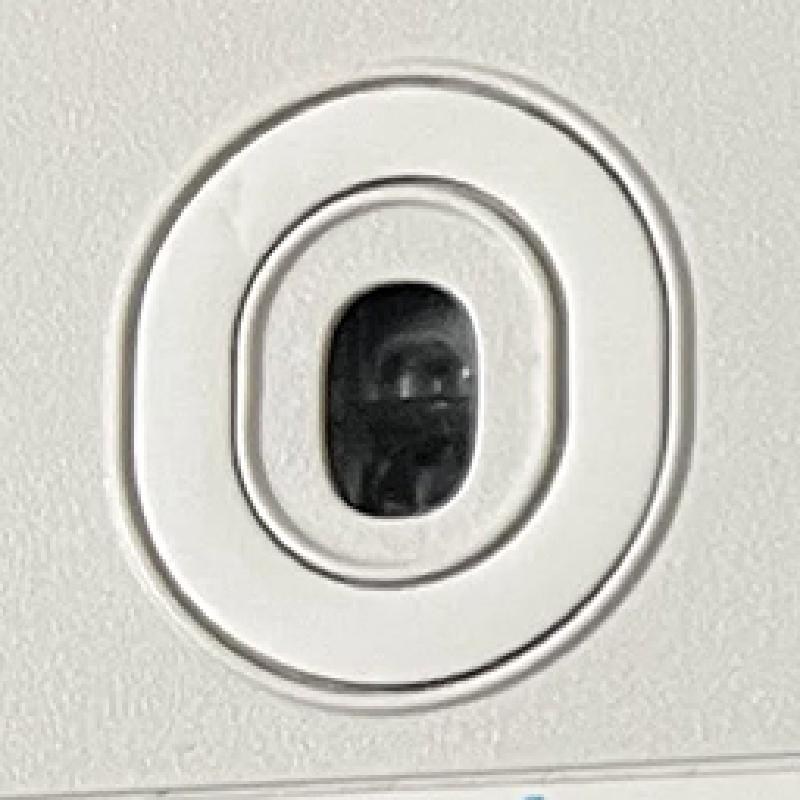
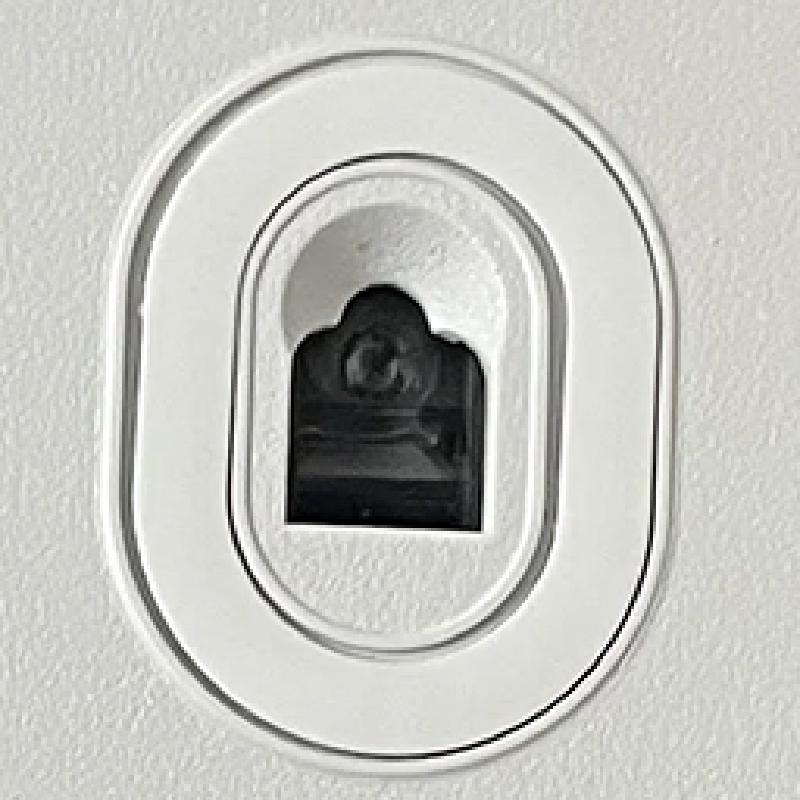
| Sensor Shape | Oval / Pill | Oval / Pill | Flat-edged / Square |
| Software | Logitech Gaming (LGS) | Logitech G HUB | Logitech G HUB |
Build and design #
The G102 has maintained the same iconic design for a decade. It’s a simple, effective build that prioritizes function:
- Shape: Widely known as the “egg” shape, the design is small, symmetrical, and simple. It’s an incredibly “safe” shape that works well for almost any grip style - even palm grip, though it’s a favorite for claw and fingertip users.
- Weight: At approximately 85g, it is now considered a “medium-weight” mouse by 2026 standards. While it can’t compete with modern 60g “superlights”, the extra weight gives it a solid, durable feel while provide significant advantages in stability, control for many users.
- Cable: It features a basic rubber cable. It is somewhat stiff compared to modern paracord-style cables, but for a budget-oriented device, it remains “good enough” for daily use and gaming for most users.
- Buttons & Scroll Wheel: The main buttons are the standout feature—loud, crisp, sharp, and very light clicks. The scroll wheel is highly tactile with distinct steps, which is excellent for games or software that require precise scrolling, though the side buttons are notably small.
- RGB: The lighting depends on which version you have. The Prodigy has a basic single-zone light (all one color at a time). The LIGHTSYNC versions, however, feature much nicer 3-zone lighting. This allows for “rainbow” wave effects where colors flow across the mouse.
Why are there three versions? #
It’s rare for a mouse to stay in production for ten years, but the G102’s journey shows how Logitech has adapted the mouse over time:
- G102 Prodigy (2016): This version launched to dominate the budget market. It introduced the Mercury Sensor, which many enthusiasts still swear by for its raw and responsive feel.
- G102 LIGHTSYNC - The RGB Modernization (2020): This was largely a cosmetic update. To compete with flashier brands, Logitech added 3-zone RGB (the “Rainbow” effect). However, they also moved away from the Mercury sensor to a different internal sensor, which many players felt wasn’t quite as stable during high-speed movements.
- G102 LIGHTSYNC - Internal Revision (~2023): In 2023, Logitech quietly updated the G102 LIGHTSYNC with a downgraded, cheaper sensor, often identified by a red LED emitter and a modified, flat-edged sensor cutout on the underside. This newer sensor change resulted in “floaty”, “heavy” feel and in some cases, causes the cursor to “jump” or not track flick shots accurately compared to the older versions. Despite the change, this newer version is still recognized by Logitech G HUB as a standard G102, supporting all DPI and RGB lighting features.
Is it still worth it in 2026? #
Short answer: yes
Longer answer: Yes, every version of the G102 is still worth it. It remains one of the best mouse in the low budget range ($20 – $30 USD). There simply aren’t many mouse at this price point that offer the same level of build quality, software support, and “egg” shape that works so well for most users.
Which version to buy? #
-
Logitech G102 Prodigy:
- This is the best version of the mouse. It features the best sensor of the lineup, a low lift-off distance, and top-tier performance—all for the same budget price.
- Perfect for competitive titles that require precision, speed, and accuracy, such as FPS or MOBA games.
- Only works well with Logitech Gaming Software (LGS), while Logitech is moving toward G HUB as its primary software.
- The Prodigy version is still compatible with G HUB, but many users experience detection issues.
-
Logitech G102 LIGHTSYNC:
- Best of both worlds; its sensor is still among the best in its price range, suitable for competitive gaming and daily use.
- Fully compatible with Logitech G HUB, so you don’t bloat your PC with another program just for the mouse.
- Higher lift-off distance than the G102 Prodigy; it may take some time to get used to it.
- Extremely rare cases where the sensor becomes inconsistent during high-speed flicks.
-
Logitech G102 LIGHTSYNC - Internal Revision:
- Still among the best in its price range, feels pretty much no different compared to older G102 versions, even for competitive gaming.
- Fully compatible with Logitech G HUB, so you don’t bloat your PC with another program just for the mouse.
- Higher lift-off distance than the G102 Prodigy.
- Problems with an inconsistent sensor become more noticeable in FPS games, but this is still very rare.
- All G102 versions have a notorious double-click problem after 6–12 months of use. Even though the G102 comes with a 2-year warranty, it is commonly reported to take between 3 to 10 business days for the process to be completed.
- There is another option: second-hand G102 boards that have already had the switches replaced with Kailh GM 8.0 (80M clicks) or TTC Gold Dustproof (100M clicks) if you want to stick with this mouse for a long time.